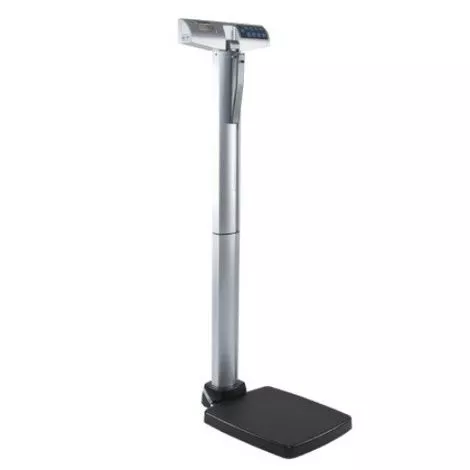
Health O Meter Digital Column Scale with Height Rod Features
- 1 scale used by medical offices
- High capacity of 485lbs with professional-grade precision
- Easy to use integrated height bar and low platform height for added stability
- Calculate the body mass index (BMI)
- Easy mounting, USB port for connectivity to PC or EMR software
- Capacity: 500 lb x 0.2 lb / 220 kg x 0.1 kg
- Measuring range: 30 – 84 1/4″ / 76 – 214 cm
- Power: 6 AA batteries included, 120V adapter (not included)
- Connectivity: USB, optional Bluetooth
Health O Meter 500kl FAQs Manual
What to buy with Health O Meter Scale 500KL
- Medline Paper Measuring Tape
- Health O Meter Pro Raised Dial Scale
- Health O Meter Digital Wheelchair Dual Ramp Scale
How to Activate the Auto Off feature on the Health o Meter 500KL?
To activate the Auto Off feature on scales with Date Code with the last two digits of 19 or lower:
- While the scale is turned off, press and hold the HOLD/RELEASE button.
- While holding the HOLD/RELEASE button, press the ON/OFF button to turn the scale on.
- “START” will briefly appear on display, followed by “AOF=1”
- Auto-off is now enabled.
To activate the Auto Off on scales with Date Code with the last two digits of 20 or higher: Enable / Disable Auto Off
- While the scale is turned off, press and hold the ENTER button, then press and release the button. Hold the ENTER button until “AOF=d” or “AOF=E” appears on display, then release. Press the ENTER button again to change the setting. AOF=d Disables the Auto Off function AOF=E Enables the Auto Off function
- Press CLEAR/REWEIGH to save your selection and exit the Options mode.
- The scale will restart. The display will show “UEr”, a version number, and then dashes. The scale is ready to use when the display shows “0.0”. Note: When powering the scale via batteries, the Auto Off function is automatically enabled.