Features of Lafayette Instrument Hand-Held Dynamometer
- Tone to indicate start, stop, or metronome
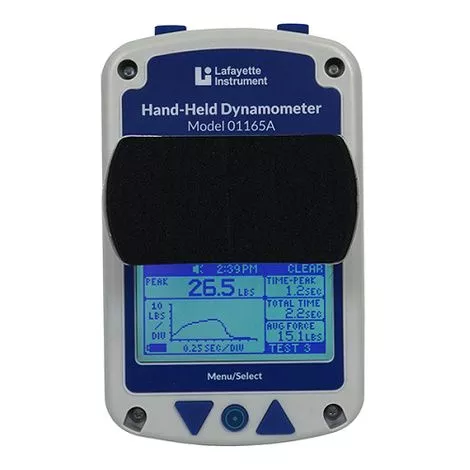
- Simple and practical style Hand Held Dynamometer that conveniently fits in the palm of your hand
- Three (3) stirrups with removable pads made of molded plastic
- The new algometer attachment allows for kPa measurements
- Data is automatically stored, and the device memory may hold up to 250 tests
- Rechargeable lithium-ion batteries power the device
- Selectable test time from 1 – 10 seconds
- Tone to indicate start, stop, and entering within a range
- Microprocessor controlled
- Built-in stored data browsing capability
- Easy to read graphical LCD display
- Automatic shut off after 5 minutes of inactivity
- Battery indicator on LCD display
What test can be done with Hand Held Dynamometer?
- End force
- Peak force
- Average force
- Total test time
- Real-time force
- Time to reach peak force
- Average force from peak to end
- Percentage decrease from peak force to end force
What to buy with Lafayette Hand Dynamometer
- New World Imports Muscle Rub Ultra Strength
- Andropharma Muscle Herbal Food Supplement
- Maximus Strength Trainer
How to use Lafayette Manual Muscle Tester?
Function Buttons:
- Power/Menu/Select Button (1): The round Menu/Select button is located on the bottom middle of the HHD. This is the button used to power on the device. Holding the Menu/Select button for 5 seconds will power off the unit. It is placed for easy access regardless of right or left hand operation. The Menu/Select allows you to enter into the Menu screen and select various options within it.
- Navigation Buttons (2,3): While on the Test screen the Navigation buttons are used to enlarge the graph and return to the Test screen from the enlarged graph or scroll through tests when in test scrolling mode. While on the Menu screen, the Navigation buttons are used to navigate the various menu screens.
- Top buttons(4,5): On the main screen, the TOP buttons are used to Send, Clear, and Start tests when applicable. On the menu screen, these buttons are used to return one screen, BACK, or return to the Test screen, TEST. These buttons can be flipped for a specific dexterity by changing the button orientation in the options menu.